
Overview
A sub account is the isolated space for one client: its own users, assigned assistants, billing, and call logs. Every sub account’s settings page has four tabs: General, Assistants, Billing, and Users.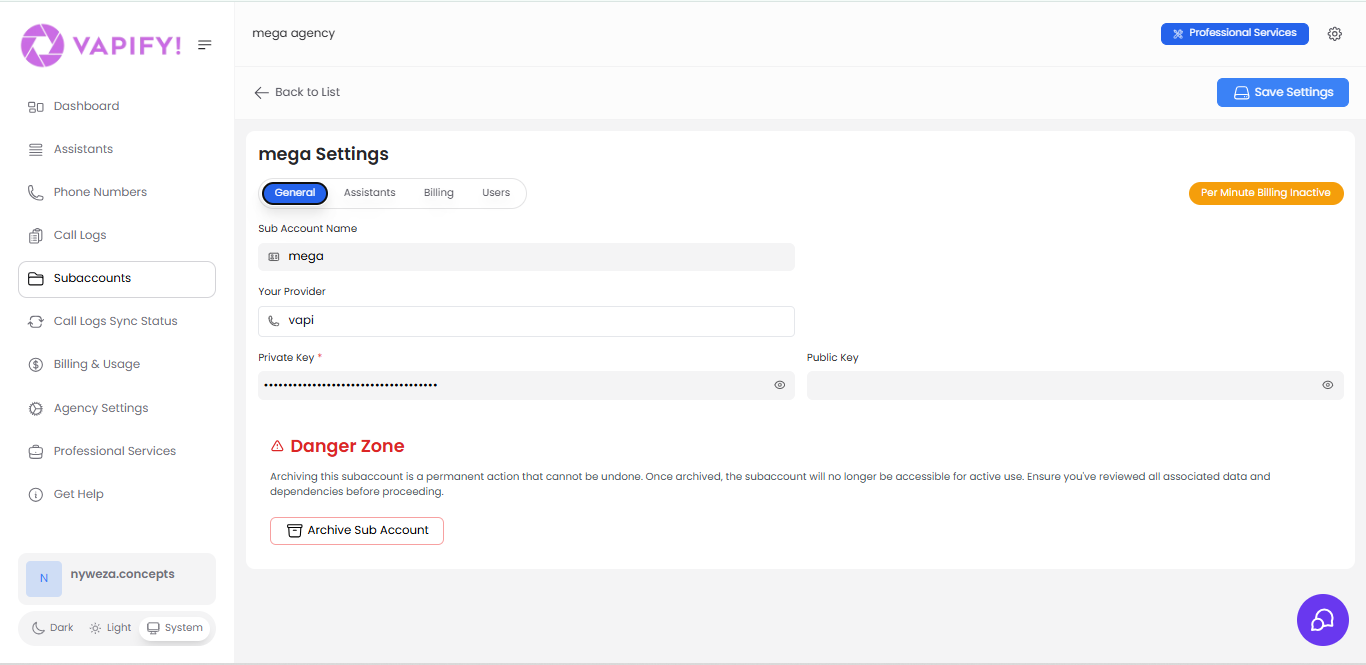
The four tabs
- General: sub account name, provider selection, and API keys. Once a Billing Start Date is set, provider API keys lock permanently.
- Assistants: which voice assistants (synced from your provider) are assigned to this client, plus the voice-widget permission toggle.
- Billing: Balance, Credits, per-minute pricing, monthly subscription, onboarding fee, and unprofitable-call protection.
- Users: who can log into this sub account, and their status (
invited,active,inactive).
Going live
“Going live” means setting the Billing Start Date (also shown as the Go Live Date). A one-time, permanent action — it cannot be changed once set. From that date forward, usage is billable, call logs begin syncing, and provider API keys lock. See Launch Your Agency for the full walkthrough.Setting the Billing Start Date runs a live test call against your provider key. If the key is invalid, go-live is blocked with “Please set a valid private key before you start billing.” Fix the key, then set the date.
Before the Billing Start Date is set, users can still log in, but call logs will not appear.
Related Articles
- Clients: day-to-day sub account management tasks
- How Vapify Works: where sub accounts sit in the object hierarchy
- How Billing Works: Balance, Credits, and pricing in depth