
Overview
Connect your voice AI provider so Vapify can pull in your assistants and track usage for billing. This is the second step of the onboarding wizard.Prerequisites
- Agency branded
- A Vapi or Retell account with at least one assistant already created
Steps
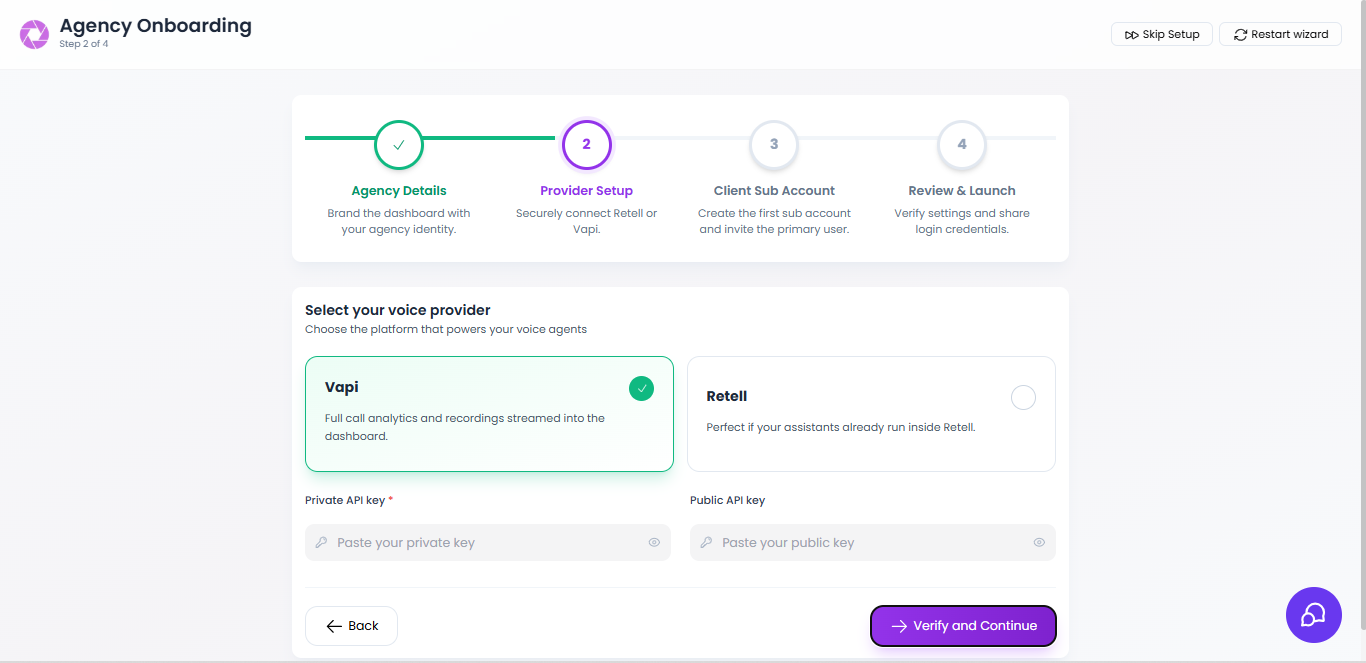
- Vapi
- Retell
1
Copy your keys
In your Vapi dashboard, open API Keys and copy both your Private API key and Public API key.
2
Select Vapi
In Vapify’s Provider Setup step (or later, in a sub account’s General tab), select Vapi.
3
Paste both keys
Paste your Private API key in the first field and your Public API key in the second field.
4
Verify
Click Verify and Continue.
Troubleshooting
- Verification fails: Re-copy the key; for Vapi, confirm the private and public keys aren’t swapped.
- Assistants don’t sync: Save the key again, then click Refresh Assistant List in the sub account’s Assistants tab.
Related Articles
- Vapi: key types, rotation, and limits
- Retell AI: key setup details
- Assign an AI Assistant: next step in the setup path