> ## Documentation Index
> Fetch the complete documentation index at: https://docs.vapify.agency/llms.txt
> Use this file to discover all available pages before exploring further.
# Custom Email
> Send platform emails from your own domain using Mailgun, Postmark, Sendgrid, or SMTP.
**Estimated time:** 5-10 minutes
## Overview
By default, platform emails (invitations, password resets, notifications) send from Vapify's address. Custom email settings let them send from your own domain instead.
 ## Prerequisites
* A paid plan (Starter, Business, Scale, or Partner). Not available on Free
* An account with Mailgun, Postmark, Sendgrid, or an existing SMTP server
## Steps
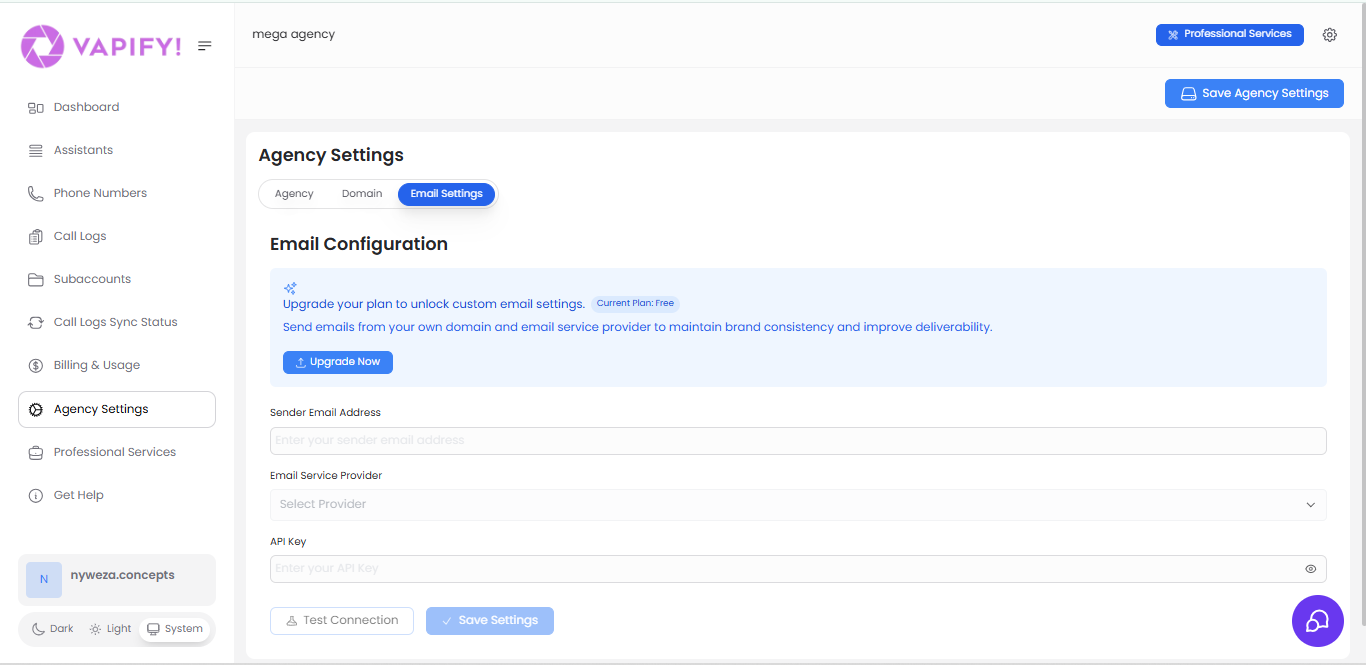
1. Go to **Agency Settings → Email Settings tab**.
2. Enter your sender email address (e.g., `support@youragency.com`).
3. Select your provider and enter its credentials:
* **Mailgun**: Private API Key (starts with "key-") from Mailgun's Settings → API Security.
* **Postmark**: Server API Token from your Postmark server's API Tokens tab.
* **Sendgrid**: API key with Mail Send permissions.
* **SMTP**: server/hostname, port (587 for TLS, 465 for SSL), username, and password (use an app-specific password for Google Workspace or Microsoft 365).
4. Click **Test Connection**.
5. Once the test succeeds, click **Save Settings**.
Mailgun and Postmark both offer free tiers and are the recommended starting points; check their pricing pages for current limits. Use SMTP only if you need a specific existing mail server.
Never use your primary email password for SMTP. Use an app-specific password, and rotate API keys periodically.
## Troubleshooting
* **Test connection fails**: Recheck the API key for typos, confirm it has send permissions, and confirm your sender address is verified with the provider.
* **Emails not received**: Check the recipient's spam folder, and confirm your domain has SPF/DKIM records set up with your provider.
## Related Articles
* [Agency Branding](/white-label/agency-branding): the rest of your brand identity
* [Custom Domain](/white-label/custom-domain): matching your domain in the platform URL
* [Mailgun](/integrations/mailgun) · [Postmark](/integrations/postmark) · [SMTP](/integrations/smtp): provider-specific integration references
## Prerequisites
* A paid plan (Starter, Business, Scale, or Partner). Not available on Free
* An account with Mailgun, Postmark, Sendgrid, or an existing SMTP server
## Steps
1. Go to **Agency Settings → Email Settings tab**.
2. Enter your sender email address (e.g., `support@youragency.com`).
3. Select your provider and enter its credentials:
* **Mailgun**: Private API Key (starts with "key-") from Mailgun's Settings → API Security.
* **Postmark**: Server API Token from your Postmark server's API Tokens tab.
* **Sendgrid**: API key with Mail Send permissions.
* **SMTP**: server/hostname, port (587 for TLS, 465 for SSL), username, and password (use an app-specific password for Google Workspace or Microsoft 365).
4. Click **Test Connection**.
5. Once the test succeeds, click **Save Settings**.
Mailgun and Postmark both offer free tiers and are the recommended starting points; check their pricing pages for current limits. Use SMTP only if you need a specific existing mail server.
Never use your primary email password for SMTP. Use an app-specific password, and rotate API keys periodically.
## Troubleshooting
* **Test connection fails**: Recheck the API key for typos, confirm it has send permissions, and confirm your sender address is verified with the provider.
* **Emails not received**: Check the recipient's spam folder, and confirm your domain has SPF/DKIM records set up with your provider.
## Related Articles
* [Agency Branding](/white-label/agency-branding): the rest of your brand identity
* [Custom Domain](/white-label/custom-domain): matching your domain in the platform URL
* [Mailgun](/integrations/mailgun) · [Postmark](/integrations/postmark) · [SMTP](/integrations/smtp): provider-specific integration references