> ## Documentation Index
> Fetch the complete documentation index at: https://docs.vapify.agency/llms.txt
> Use this file to discover all available pages before exploring further.
# Invite Your Client
> Share dashboard access and login credentials with your client securely.
**Estimated time:** 2 minutes
## Overview
Once pricing is set, share access with your client so they can log in and see their assistant, usage, and billing.
## Prerequisites
* [Pricing configured](/getting-started/configure-pricing)
## Steps
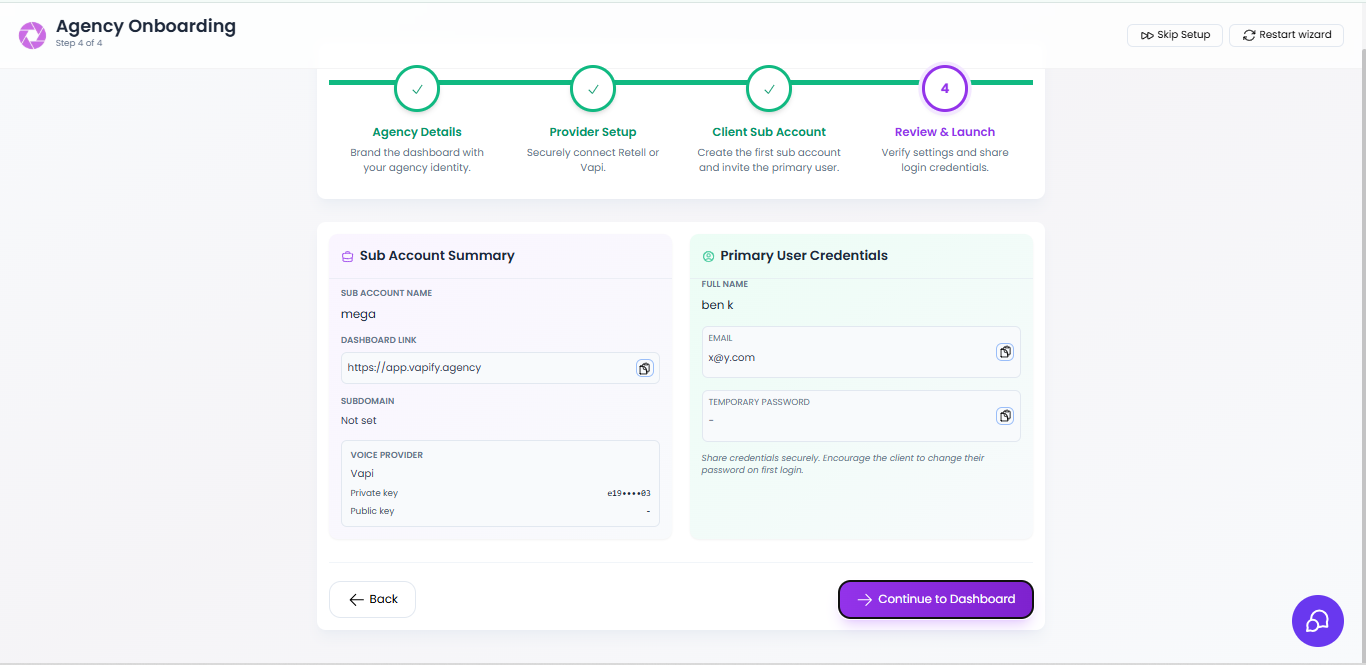 From the wizard's **Review & Launch** step (or the sub account's **Users** tab), review the sub account summary: dashboard URL, subdomain status, connected provider, and masked API keys.
Copy the **Temporary Password** shown for the primary user (the only time it appears in plain text) and note the **dashboard URL** your client will use to log in.
Share the dashboard URL, email, and temporary password with your client through a secure channel (password manager, encrypted email, or a secure sharing service).
Ask your client to change their password immediately after their first login.
The temporary password is displayed in plain text only once, on this screen. If you didn't copy it, you'll need to reset the primary user's password from the sub account's Users tab.
## Tips
* Use a secure password-sharing service or encrypted email rather than plain chat or SMS.
* To invite additional team members to the same sub account later, use **New Sub Account User** from the Users tab.
## Related Articles
* [Inviting Team Members](/team-management/inviting-team-members): adding more users to a sub account later
* [Client Experience](/white-label/client-experience): what your client sees after logging in
From the wizard's **Review & Launch** step (or the sub account's **Users** tab), review the sub account summary: dashboard URL, subdomain status, connected provider, and masked API keys.
Copy the **Temporary Password** shown for the primary user (the only time it appears in plain text) and note the **dashboard URL** your client will use to log in.
Share the dashboard URL, email, and temporary password with your client through a secure channel (password manager, encrypted email, or a secure sharing service).
Ask your client to change their password immediately after their first login.
The temporary password is displayed in plain text only once, on this screen. If you didn't copy it, you'll need to reset the primary user's password from the sub account's Users tab.
## Tips
* Use a secure password-sharing service or encrypted email rather than plain chat or SMS.
* To invite additional team members to the same sub account later, use **New Sub Account User** from the Users tab.
## Related Articles
* [Inviting Team Members](/team-management/inviting-team-members): adding more users to a sub account later
* [Client Experience](/white-label/client-experience): what your client sees after logging in