> ## Documentation Index
> Fetch the complete documentation index at: https://docs.vapify.agency/llms.txt
> Use this file to discover all available pages before exploring further.
# Assign an AI Assistant
> Sync assistants from your provider and assign one to your new client sub account.
**Estimated time:** 4 minutes
## Overview
Assistants are always created in your provider's dashboard (Vapi or Retell), never inside Vapify. This page covers syncing them and assigning one to the sub account you just created.
## Prerequisites
* [Client created](/getting-started/create-your-first-client)
* At least one assistant created in your provider's dashboard, with a phone number attached if it needs to take phone calls
## Steps
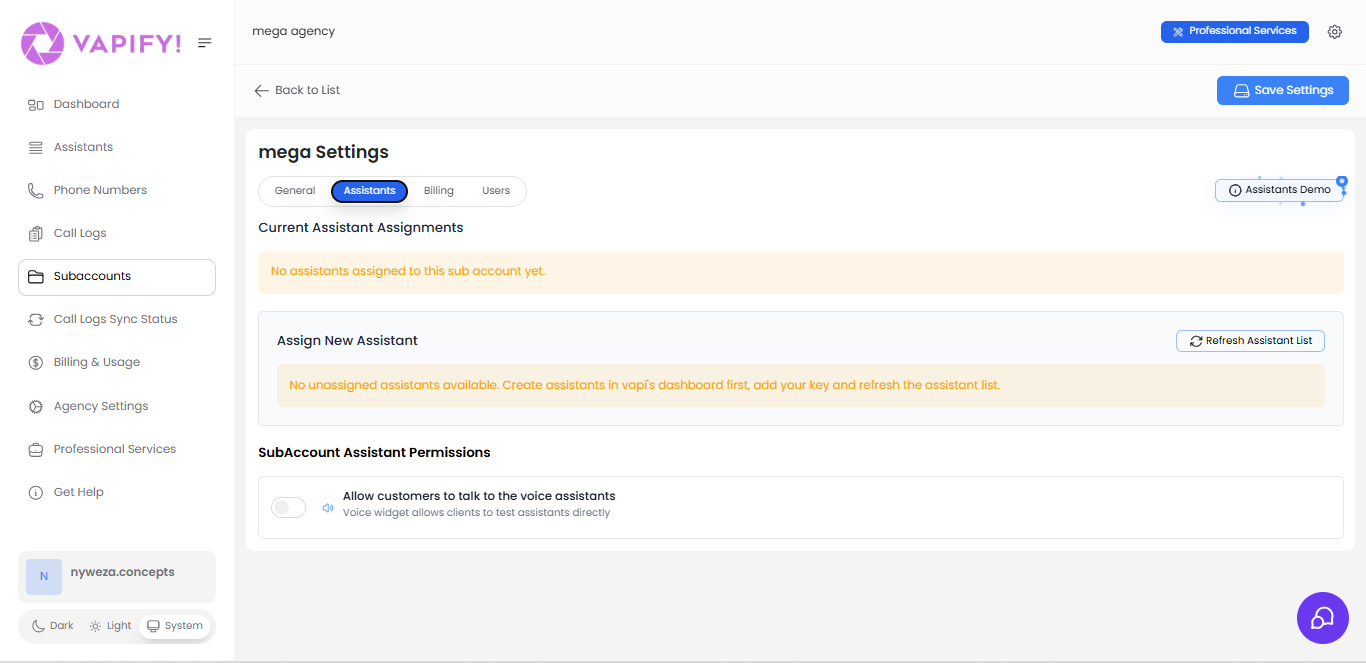 Open the client's sub account and go to the **General** tab.
Add your provider API key here if this sub account uses a different provider account than your agency default, then click **Save Settings**. This syncs assistants from your provider.
Switch to the **Assistants** tab, and under **Assign New Assistant**, select the assistant(s) to assign to this sub account.
If a recently created assistant doesn't appear, click **Refresh Assistant List**.
An assistant can only be assigned to one sub account at a time. For similar assistants across multiple clients, create separate assistants in your provider and assign each to its own sub account.
## Tips
* Attach phone numbers to assistants that need to handle phone calls. Web-call-only assistants don't need one.
* Use a consistent naming convention in your provider dashboard (e.g., "ClientName-SalesBot") to keep assignments easy to audit.
## Troubleshooting
* **Assistant not appearing**: Confirm the provider API key is correct, save settings again, then click **Refresh Assistant List**.
* **Cannot edit provider API key**: This sub account has already gone live (a Billing Start Date is set); provider keys lock permanently once that happens.
## Related Articles
* [AI Assistants](/running-your-agency/ai-assistants): the full assistant management reference
* [Configure Pricing](/getting-started/configure-pricing): set per-minute pricing for this assistant
* [Vapi](/integrations/vapi) · [Retell AI](/integrations/retell): provider-specific key and setup details
Open the client's sub account and go to the **General** tab.
Add your provider API key here if this sub account uses a different provider account than your agency default, then click **Save Settings**. This syncs assistants from your provider.
Switch to the **Assistants** tab, and under **Assign New Assistant**, select the assistant(s) to assign to this sub account.
If a recently created assistant doesn't appear, click **Refresh Assistant List**.
An assistant can only be assigned to one sub account at a time. For similar assistants across multiple clients, create separate assistants in your provider and assign each to its own sub account.
## Tips
* Attach phone numbers to assistants that need to handle phone calls. Web-call-only assistants don't need one.
* Use a consistent naming convention in your provider dashboard (e.g., "ClientName-SalesBot") to keep assignments easy to audit.
## Troubleshooting
* **Assistant not appearing**: Confirm the provider API key is correct, save settings again, then click **Refresh Assistant List**.
* **Cannot edit provider API key**: This sub account has already gone live (a Billing Start Date is set); provider keys lock permanently once that happens.
## Related Articles
* [AI Assistants](/running-your-agency/ai-assistants): the full assistant management reference
* [Configure Pricing](/getting-started/configure-pricing): set per-minute pricing for this assistant
* [Vapi](/integrations/vapi) · [Retell AI](/integrations/retell): provider-specific key and setup details