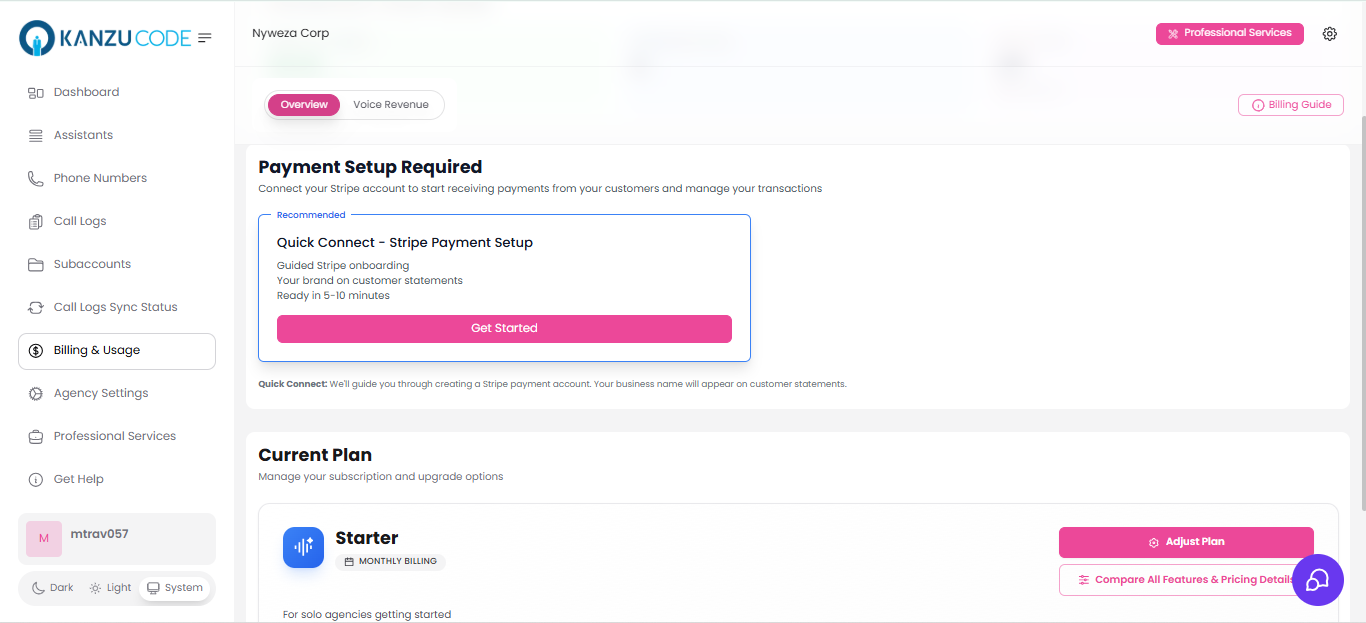
 ### Step 2: Complete Stripe Onboarding
Stripe will guide you through providing:
* Business information
* Banking details (for payouts)
* Identity verification
This typically takes 5-10 minutes.
### Step 3: Verify Connection
Once connected, you'll see:
* ✅ Connected Account ID
* Your account status
* Link to Stripe Dashboard
### Step 2: Complete Stripe Onboarding
Stripe will guide you through providing:
* Business information
* Banking details (for payouts)
* Identity verification
This typically takes 5-10 minutes.
### Step 3: Verify Connection
Once connected, you'll see:
* ✅ Connected Account ID
* Your account status
* Link to Stripe Dashboard
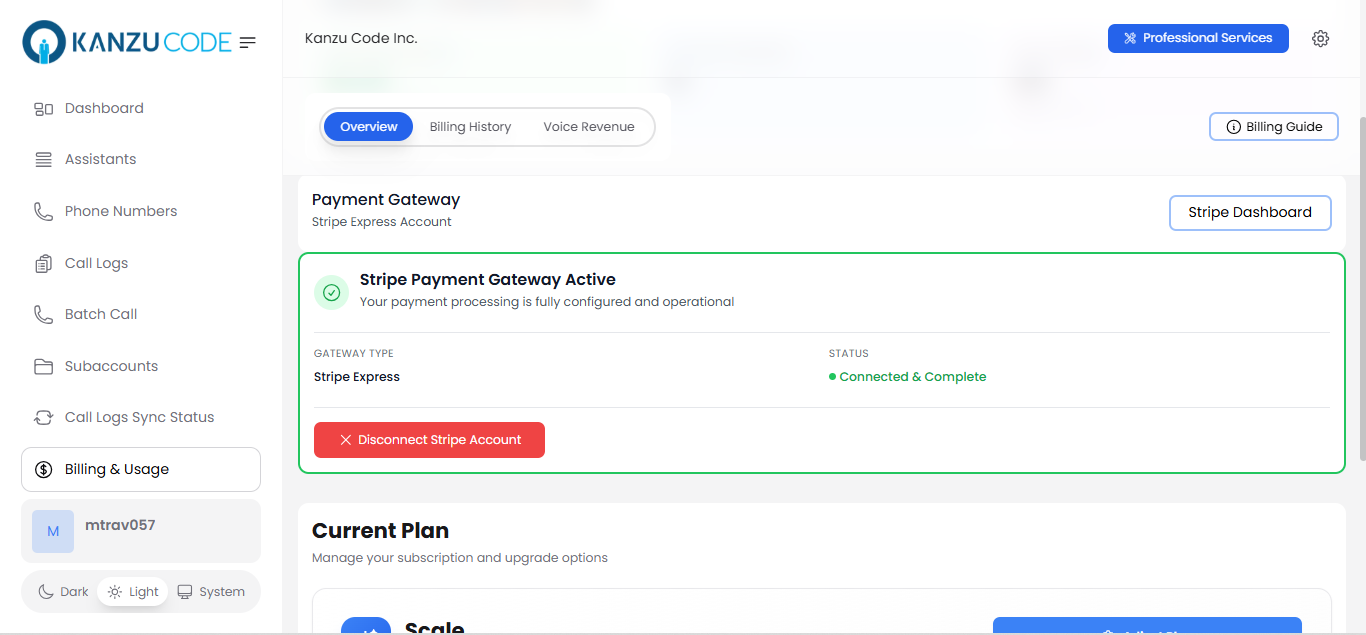 **Important:** Your clients' payments go directly to your Stripe account. Vapify never holds your funds.
### Managing Your Stripe Account
**View your Stripe Dashboard:**
1. Go to Billing & Usage
2. Click Stripe Dashboard
3. See payments, payouts, and customer data
**Disconnect Stripe (if needed):**
1. Go to Agency Settings → Billing
2. Click Disconnect Stripe
3. Confirm disconnection
⚠️ **Warning:** Disconnecting Stripe will prevent new client payments and subscriptions.
***
## Pricing Your Services
You have two main billing models to choose from. Pick the one that fits your business:
### Billing Model Comparison
| Feature | Monthly Fee + Per-Minute | Monthly Packages |
| --------------- | -------------------------------- | -------------------------------------- |
| **Best For** | Simple, flexible pricing | Predictable monthly costs |
| **Client Pays** | Monthly fee + usage charges | One monthly price (includes minutes) |
| **Overage** | No concept of overage | Charge extra for minutes over limit |
| **Complexity** | Simple to explain | Slightly more complex |
| **Example** | $49/mo + $0.40/min for all calls | $99/mo for 200 min + $0.60/min overage |
### Which Model Should You Choose?
**Choose Monthly Fee + Per-Minute if:**
✅ You want simple, transparent pricing\
✅ Client usage varies widely month to month\
✅ You want clients to pay for exactly what they use\
✅ You prefer SaaS-style "base + usage" pricing
**Choose Monthly Packages if:**
✅ You want predictable monthly revenue\
✅ Clients want to know their base cost upfront\
✅ You offer tiered plans (Starter/Pro/Enterprise)\
✅ You want to encourage higher usage with included minutes
You can also offer both! Different clients can use different models based on their needs.
***
## Billing Model 1: Monthly Fee + Per-Minute
Simple, flexible pricing: charge a monthly platform fee plus usage-based per-minute charges.
### How It Works
```
Monthly Platform Fee: $49/month (via Stripe subscription)
+
Per-Minute Charges: $0.40/minute (deducted from prepaid balance)
=
Total Monthly Bill: $49 + usage charges
```
**Example Month:**
Client makes 150 minutes of calls
```
Charges:
├── Monthly Platform Fee: $49.00 (auto-charged by Stripe)
└── Usage Charges: 150 × $0.40 = $60.00 (deducted from balance)
Total: $109.00
```
### Setting Up This Model
**Important:** Your clients' payments go directly to your Stripe account. Vapify never holds your funds.
### Managing Your Stripe Account
**View your Stripe Dashboard:**
1. Go to Billing & Usage
2. Click Stripe Dashboard
3. See payments, payouts, and customer data
**Disconnect Stripe (if needed):**
1. Go to Agency Settings → Billing
2. Click Disconnect Stripe
3. Confirm disconnection
⚠️ **Warning:** Disconnecting Stripe will prevent new client payments and subscriptions.
***
## Pricing Your Services
You have two main billing models to choose from. Pick the one that fits your business:
### Billing Model Comparison
| Feature | Monthly Fee + Per-Minute | Monthly Packages |
| --------------- | -------------------------------- | -------------------------------------- |
| **Best For** | Simple, flexible pricing | Predictable monthly costs |
| **Client Pays** | Monthly fee + usage charges | One monthly price (includes minutes) |
| **Overage** | No concept of overage | Charge extra for minutes over limit |
| **Complexity** | Simple to explain | Slightly more complex |
| **Example** | $49/mo + $0.40/min for all calls | $99/mo for 200 min + $0.60/min overage |
### Which Model Should You Choose?
**Choose Monthly Fee + Per-Minute if:**
✅ You want simple, transparent pricing\
✅ Client usage varies widely month to month\
✅ You want clients to pay for exactly what they use\
✅ You prefer SaaS-style "base + usage" pricing
**Choose Monthly Packages if:**
✅ You want predictable monthly revenue\
✅ Clients want to know their base cost upfront\
✅ You offer tiered plans (Starter/Pro/Enterprise)\
✅ You want to encourage higher usage with included minutes
You can also offer both! Different clients can use different models based on their needs.
***
## Billing Model 1: Monthly Fee + Per-Minute
Simple, flexible pricing: charge a monthly platform fee plus usage-based per-minute charges.
### How It Works
```
Monthly Platform Fee: $49/month (via Stripe subscription)
+
Per-Minute Charges: $0.40/minute (deducted from prepaid balance)
=
Total Monthly Bill: $49 + usage charges
```
**Example Month:**
Client makes 150 minutes of calls
```
Charges:
├── Monthly Platform Fee: $49.00 (auto-charged by Stripe)
└── Usage Charges: 150 × $0.40 = $60.00 (deducted from balance)
Total: $109.00
```
### Setting Up This Model
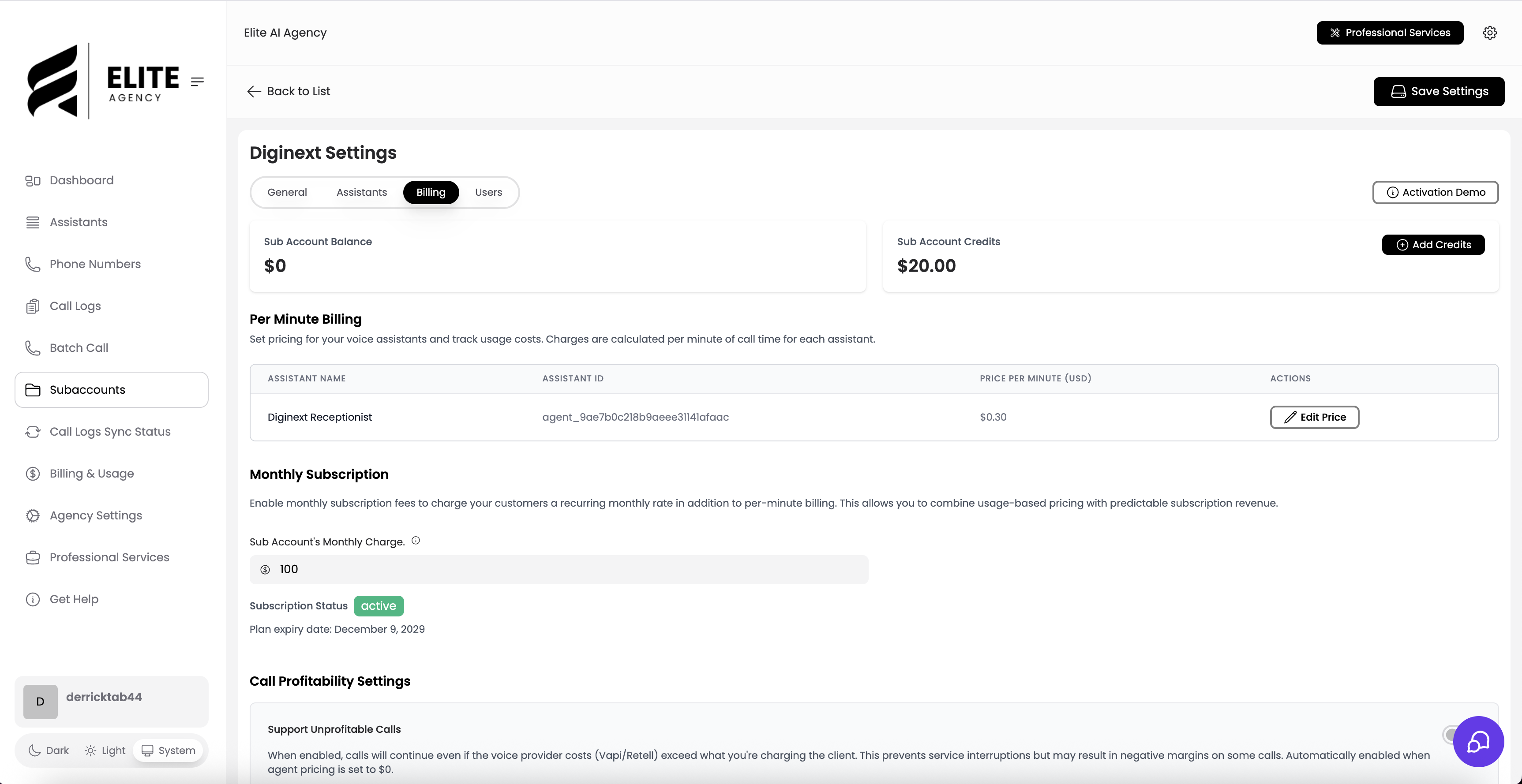 #### Step 1: Configure Monthly Fee
1. In your subaccount billing settings, enable the monthly billing option (if your plan allows)
2. Set Monthly Subscription Fee: eg. \$49.00
3. This creates a Stripe subscription for the monthly fee
#### Step 2: Set Per-Minute Rate
1. In your subaccount billing settings.
2. Set Price per Minute: eg. \$0.40
3. This applies to ALL calls made by this assistant
#### Step 3: Client Loads Balance
Your client needs prepaid balance for per-minute charges:
1. Client logs into their dashboard
2. Clicks Top up Balance
3. Pays via Stripe
4. Balance available immediately
### How Billing Works
**Monthly Subscription (Automated):**
* Stripe auto-charges client on billing anniversary
* Example: If client subscribes on Nov 15, charges every month on the 15th
* Handles failed payments, retries, notifications
* You see revenue in your Stripe Dashboard
**Per-Minute Charges (Real-Time):**
* After each call, system calculates: minutes × per-minute rate
* Amount deducted from client's prepaid balance
* Client sees transaction in their billing history
* Happens instantly when call ends
### Client Balance Management
Client dashboard shows:
```
💰 Account Balance
─────────────────────────
Balance: $150.00
Credits: $25.00 (bonus)
Total Available: $175.00
Monthly Subscription:
Next charge on Dec 15: $49.00
```
**What happens if balance runs low:**
```
⚠️ Low Balance Warning
Your balance is running low ($8.50 remaining).
Add funds to continue making calls.
[Add Funds]
```
**What happens if balance hits \$0:**
```
🔒 Insufficient Balance
Cannot place call - balance is $0.00.
Please add funds to continue.
[Add Funds Now]
```
### Variations of This Model
**Pure Per-Minute (No Monthly Fee):**
```
Monthly Fee: $0
Per-Minute: $0.50
```
Simple pay-as-you-go with no recurring charges.
**High Monthly Fee, Low Per-Minute:**
```
Monthly Fee: $199
Per-Minute: $0.20
```
Premium plan with low usage costs.
**Low Monthly Fee, High Per-Minute:**
```
Monthly Fee: $29
Per-Minute: $0.60
```
Affordable entry, pay more for heavy usage.
### When to Use This Model
**✅ Perfect for clients who:**
* Have unpredictable call volumes
* Want to pay for exactly what they use
* Prefer clear, itemized billing
* Are comfortable loading prepaid balance
**❌ Not ideal for clients who:**
* Want one predictable monthly charge
* Don't want to monitor balance
* Make consistent monthly call volumes
* Prefer "all-inclusive" packages
***
## Billing Model 2: Monthly Packages
Predictable monthly pricing with included minutes and overage charges.
### How It Works
```
Monthly Package: $99/month
Includes: 200 minutes
Overage Rate: $0.60/minute
↓
Client uses 230 minutes
↓
Charges:
├── Base Package: $99.00 (includes first 200 min)
└── Overage: 30 min × $0.60 = $18.00
Total: $117.00
```
### Usage Dashboard
Client sees in real-time:
```
📊 Current Month Usage
─────────────────────────────────
Used: 187 / 200 minutes (94%)
Remaining: 13 minutes
Resets in: 12 days
Overage charges this month: $0.00
```
**When approaching limit:**
```
⚠️ Approaching Monthly Limit
You've used 195 of 200 included minutes.
Overage rate: $0.60/minute
Need more minutes? Upgrade your plan or add
prepaid balance to cover overage charges.
```
**After exceeding limit:**
```
📊 Current Month Usage
─────────────────────────────────
Used: 227 / 200 minutes
Overage: 27 minutes × $0.60 = $16.20
Next charge on Dec 15:
├── Monthly Package: $99.00
└── Overage: $16.20
Total: $115.20
```
***
## Managing Client Balances
### Understanding Balance Types
Your clients have two "wallets" for prepaid funds:
**Balance 💰 (Green wallet)**
* Loaded by client via Stripe payments
* Client controls when to add funds
* Self-service, automated
**Credits 🎁 (Blue wallet)**
* Added manually by you
* Promotional, bonus, or compensation
* Your discretion
**How they're used:**
```
Credits are always used FIRST, then Balance
Example:
Credits: $25.00
Balance: $75.00
Total Available: $100.00
After $30 charge:
Credits: $0.00 (used first)
Balance: $70.00 ($5 deducted after credits)
Total Available: $70.00
```
### When Balance Is Needed
**Monthly Fee + Per-Minute Model:**
✅ Required for all per-minute charges\
Client must load balance before making calls
**Monthly Package Model:**
⚠️ Only required for overage charges\
If client stays within included minutes, no balance needed\
If client exceeds, balance must cover overage
**Demo Accounts:**
❌ Not required - demo calls are free
### Low Balance Alerts
Automatic client warnings:
**At \$20 remaining:**
```
📧 Email: "Low Balance Alert"
Your Vapify account balance is running low ($18.50).
Add funds to avoid service interruption.
[Add Funds]
```
**At \$10 remaining:**
```
⚠️ Dashboard Banner:
"Low Balance: $8.50 remaining. Add funds to continue service."
[Add Funds]
```
**At \$0:**
```
🔒 Service Suspended
Your balance is $0.00 and you cannot make calls
until you add funds to your account.
[Add Funds Now]
```
**You can customize thresholds:**
1. Go to Agency Settings → Notifications
2. Set warning levels:
* Warning threshold: \$25
* Critical threshold: \$10
* Suspend at: \$0
**Auto top-up (optional):**
Clients can enable auto top-up so their balance replenishes automatically when it drops below a set threshold. This helps avoid service interruptions during high-usage periods.
### Refunding Balance
If you need to refund a client:
1. Go to Clients → Select client → Billing
2. Click Issue Refund
3. Enter details:
```
Issue Refund
─────────────────────────
Amount: $50.00
Refund Method:
○ Stripe Refund (money returned)
○ Account Credit (stays as balance)
Reason:
[ Service issue - refunding unused balance ]
[Process Refund]
```
**Stripe Refund:**
* Money returned to client's payment method
* Shows in their bank/card statement
* Deducts from your Stripe balance
**Account Credit:**
* Stays in client's Vapify balance
* Can use for future calls
* No Stripe transaction
***
## Understanding Profitability
Make sure you're making money on every call!
### The Profitability Formula
```
Your Profit = What You Charge - Provider Cost
Example:
You charge: $0.50/minute
Provider costs: $0.30/minute
Your profit: $0.20/minute (40% margin)
```
### Real-World Example
10-minute call:
```
Provider charges Vapify: $3.00
You charge your client: $5.00
Your profit: $2.00
Profit margin: 40%
```
### Profitability Checks
Vapify automatically prevents unprofitable calls:
**Scenario 1: Profitable Call ✅**
```
Provider cost: $3.00 (10 minutes)
Your price: $5.00 (10 × $0.50/min)
Profit: $2.00 ✅
Result: Call processes normally
```
**Scenario 2: Unprofitable Call ⚠️**
```
Provider cost: $6.00 (10 minutes)
Your price: $5.00 (10 × $0.50/min)
Loss: -$1.00 ⚠️
Result: Call blocked, assistant flagged
```
💡 **Pro tip:** Set prices at \$0.50 or higher to maintain healthy margins as provider costs fluctuate.
***
## Billing Best Practices
### 1. Choose the Right Model for Each Client
**Monthly Fee + Per-Minute:**
* Medical offices with varying call volumes
* Seasonal businesses
* Testing new clients
* Clients who want flexibility
**Monthly Packages:**
* Established clients with consistent usage
* Clients who value predictability
* Higher-value clients
* When you want recurring revenue
### 2. Set Competitive but Profitable Prices
Research your market:
* Check what competitors charge
* Consider your client's industry
* Factor in your service value-adds
* Always maintain 30%+ margin
**Example pricing by industry:**
```
Medical Practices: $0.60 - $0.80/min
→ High value, regulatory compliance
Dental Offices: $0.50 - $0.70/min
→ Moderate volume, appointment scheduling
Real Estate: $0.40 - $0.60/min
→ High volume, lead qualification
General Business: $0.50 - $0.70/min
→ Varies by use case
```
***
## FAQs
#### Step 1: Configure Monthly Fee
1. In your subaccount billing settings, enable the monthly billing option (if your plan allows)
2. Set Monthly Subscription Fee: eg. \$49.00
3. This creates a Stripe subscription for the monthly fee
#### Step 2: Set Per-Minute Rate
1. In your subaccount billing settings.
2. Set Price per Minute: eg. \$0.40
3. This applies to ALL calls made by this assistant
#### Step 3: Client Loads Balance
Your client needs prepaid balance for per-minute charges:
1. Client logs into their dashboard
2. Clicks Top up Balance
3. Pays via Stripe
4. Balance available immediately
### How Billing Works
**Monthly Subscription (Automated):**
* Stripe auto-charges client on billing anniversary
* Example: If client subscribes on Nov 15, charges every month on the 15th
* Handles failed payments, retries, notifications
* You see revenue in your Stripe Dashboard
**Per-Minute Charges (Real-Time):**
* After each call, system calculates: minutes × per-minute rate
* Amount deducted from client's prepaid balance
* Client sees transaction in their billing history
* Happens instantly when call ends
### Client Balance Management
Client dashboard shows:
```
💰 Account Balance
─────────────────────────
Balance: $150.00
Credits: $25.00 (bonus)
Total Available: $175.00
Monthly Subscription:
Next charge on Dec 15: $49.00
```
**What happens if balance runs low:**
```
⚠️ Low Balance Warning
Your balance is running low ($8.50 remaining).
Add funds to continue making calls.
[Add Funds]
```
**What happens if balance hits \$0:**
```
🔒 Insufficient Balance
Cannot place call - balance is $0.00.
Please add funds to continue.
[Add Funds Now]
```
### Variations of This Model
**Pure Per-Minute (No Monthly Fee):**
```
Monthly Fee: $0
Per-Minute: $0.50
```
Simple pay-as-you-go with no recurring charges.
**High Monthly Fee, Low Per-Minute:**
```
Monthly Fee: $199
Per-Minute: $0.20
```
Premium plan with low usage costs.
**Low Monthly Fee, High Per-Minute:**
```
Monthly Fee: $29
Per-Minute: $0.60
```
Affordable entry, pay more for heavy usage.
### When to Use This Model
**✅ Perfect for clients who:**
* Have unpredictable call volumes
* Want to pay for exactly what they use
* Prefer clear, itemized billing
* Are comfortable loading prepaid balance
**❌ Not ideal for clients who:**
* Want one predictable monthly charge
* Don't want to monitor balance
* Make consistent monthly call volumes
* Prefer "all-inclusive" packages
***
## Billing Model 2: Monthly Packages
Predictable monthly pricing with included minutes and overage charges.
### How It Works
```
Monthly Package: $99/month
Includes: 200 minutes
Overage Rate: $0.60/minute
↓
Client uses 230 minutes
↓
Charges:
├── Base Package: $99.00 (includes first 200 min)
└── Overage: 30 min × $0.60 = $18.00
Total: $117.00
```
### Usage Dashboard
Client sees in real-time:
```
📊 Current Month Usage
─────────────────────────────────
Used: 187 / 200 minutes (94%)
Remaining: 13 minutes
Resets in: 12 days
Overage charges this month: $0.00
```
**When approaching limit:**
```
⚠️ Approaching Monthly Limit
You've used 195 of 200 included minutes.
Overage rate: $0.60/minute
Need more minutes? Upgrade your plan or add
prepaid balance to cover overage charges.
```
**After exceeding limit:**
```
📊 Current Month Usage
─────────────────────────────────
Used: 227 / 200 minutes
Overage: 27 minutes × $0.60 = $16.20
Next charge on Dec 15:
├── Monthly Package: $99.00
└── Overage: $16.20
Total: $115.20
```
***
## Managing Client Balances
### Understanding Balance Types
Your clients have two "wallets" for prepaid funds:
**Balance 💰 (Green wallet)**
* Loaded by client via Stripe payments
* Client controls when to add funds
* Self-service, automated
**Credits 🎁 (Blue wallet)**
* Added manually by you
* Promotional, bonus, or compensation
* Your discretion
**How they're used:**
```
Credits are always used FIRST, then Balance
Example:
Credits: $25.00
Balance: $75.00
Total Available: $100.00
After $30 charge:
Credits: $0.00 (used first)
Balance: $70.00 ($5 deducted after credits)
Total Available: $70.00
```
### When Balance Is Needed
**Monthly Fee + Per-Minute Model:**
✅ Required for all per-minute charges\
Client must load balance before making calls
**Monthly Package Model:**
⚠️ Only required for overage charges\
If client stays within included minutes, no balance needed\
If client exceeds, balance must cover overage
**Demo Accounts:**
❌ Not required - demo calls are free
### Low Balance Alerts
Automatic client warnings:
**At \$20 remaining:**
```
📧 Email: "Low Balance Alert"
Your Vapify account balance is running low ($18.50).
Add funds to avoid service interruption.
[Add Funds]
```
**At \$10 remaining:**
```
⚠️ Dashboard Banner:
"Low Balance: $8.50 remaining. Add funds to continue service."
[Add Funds]
```
**At \$0:**
```
🔒 Service Suspended
Your balance is $0.00 and you cannot make calls
until you add funds to your account.
[Add Funds Now]
```
**You can customize thresholds:**
1. Go to Agency Settings → Notifications
2. Set warning levels:
* Warning threshold: \$25
* Critical threshold: \$10
* Suspend at: \$0
**Auto top-up (optional):**
Clients can enable auto top-up so their balance replenishes automatically when it drops below a set threshold. This helps avoid service interruptions during high-usage periods.
### Refunding Balance
If you need to refund a client:
1. Go to Clients → Select client → Billing
2. Click Issue Refund
3. Enter details:
```
Issue Refund
─────────────────────────
Amount: $50.00
Refund Method:
○ Stripe Refund (money returned)
○ Account Credit (stays as balance)
Reason:
[ Service issue - refunding unused balance ]
[Process Refund]
```
**Stripe Refund:**
* Money returned to client's payment method
* Shows in their bank/card statement
* Deducts from your Stripe balance
**Account Credit:**
* Stays in client's Vapify balance
* Can use for future calls
* No Stripe transaction
***
## Understanding Profitability
Make sure you're making money on every call!
### The Profitability Formula
```
Your Profit = What You Charge - Provider Cost
Example:
You charge: $0.50/minute
Provider costs: $0.30/minute
Your profit: $0.20/minute (40% margin)
```
### Real-World Example
10-minute call:
```
Provider charges Vapify: $3.00
You charge your client: $5.00
Your profit: $2.00
Profit margin: 40%
```
### Profitability Checks
Vapify automatically prevents unprofitable calls:
**Scenario 1: Profitable Call ✅**
```
Provider cost: $3.00 (10 minutes)
Your price: $5.00 (10 × $0.50/min)
Profit: $2.00 ✅
Result: Call processes normally
```
**Scenario 2: Unprofitable Call ⚠️**
```
Provider cost: $6.00 (10 minutes)
Your price: $5.00 (10 × $0.50/min)
Loss: -$1.00 ⚠️
Result: Call blocked, assistant flagged
```
💡 **Pro tip:** Set prices at \$0.50 or higher to maintain healthy margins as provider costs fluctuate.
***
## Billing Best Practices
### 1. Choose the Right Model for Each Client
**Monthly Fee + Per-Minute:**
* Medical offices with varying call volumes
* Seasonal businesses
* Testing new clients
* Clients who want flexibility
**Monthly Packages:**
* Established clients with consistent usage
* Clients who value predictability
* Higher-value clients
* When you want recurring revenue
### 2. Set Competitive but Profitable Prices
Research your market:
* Check what competitors charge
* Consider your client's industry
* Factor in your service value-adds
* Always maintain 30%+ margin
**Example pricing by industry:**
```
Medical Practices: $0.60 - $0.80/min
→ High value, regulatory compliance
Dental Offices: $0.50 - $0.70/min
→ Moderate volume, appointment scheduling
Real Estate: $0.40 - $0.60/min
→ High volume, lead qualification
General Business: $0.50 - $0.70/min
→ Varies by use case
```
***
## FAQs
Yes! Different clients can use different models:
Set monthly fee to \$0 and just set the per-minute rate on each assistant.
For subscriptions:
For balance top-ups:
Yes:
Stripe refunds typically take 5-10 business days to appear in client's bank account.
No platform fees on payments! You pay:
All client payments go directly to your Stripe account.
No - credits are non-refundable once added. Only add what you intend to give away.
Options:
Check your service agreement and local regulations.
Immediately when call ends:
Real-time billing prevents billing disputes.
Yes! Clients can view:
Full transparency builds trust.
Calls continue to work! Voice providers (Vapi/Retell) handle calls independently. Billing may be delayed slightly but all calls are eventually billed correctly.